BACG + Strategy
Strategic evolution, project portfolio management, universal semantic layer (Mosaic) and corporate governance. We strengthen the alignment of business goals with deterministic agentic AI.
From Strategy to Concrete Results
We help executive committees and operating teams maintain coherence, focus and execution speed.
Strategic Governance & OKRs
Structured definition of objectives, key results and departmental goals with continuous traceability.
Performance Monitoring
Centralized visibility for executives through dynamic dashboards that flag early deviations.
Integration with BACG Ecosystems
Linking strategic metrics with ERP transactional data and the corporate analytics infrastructure.
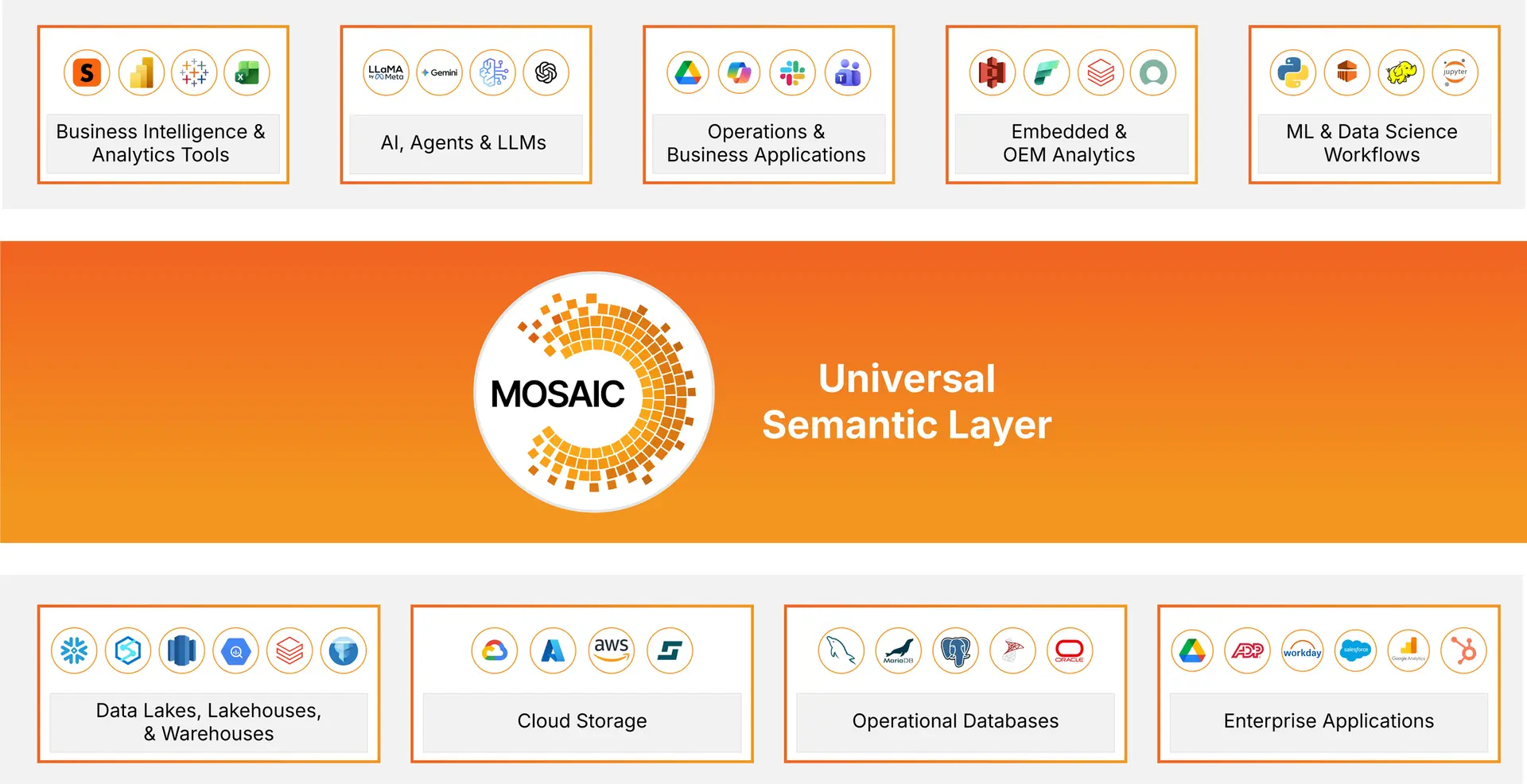
A universal semantic layer that delivers governed, trusted, AI-ready data to BI tools, AI agents and applications.
Universal semantic layer
Define metrics, hierarchies and business rules once. Connect more than 200 data sources and deliver AI-ready information. It also connects AI assistants such as Copilot and Claude through MCP, so they answer with the same governed definitions.
- Level-based metrics, custom calendars and localization rules
- Native connectors to Snowflake, Databricks, BigQuery, Redshift, Azure Synapse, SAP, Oracle, Salesforce and Workday
- Switch BI tools, clouds or databases without rebuilding
▶ Watch the video: Mosaic Studio
▶ Watch the video: The Power of Mosaic and Copilot
▶ Watch the video: Turning Questions into Actions: The Power of Claude and Mosaic
Data governance with Mosaic Sentinel
Policies, access controls and auditing that travel with the data. Monitors quality in real time and protects personal data.
- Rules, policies and compliance defined in Mosaic Sentinel
- Centralized monitoring and real-time anomaly detection
- Audit trails and lineage for every action on the data
Application integration
A single version of your KPIs in Power BI, Tableau, Excel and other tools, without migrating data or rebuilding dashboards.
- Data stays where it is, in the cloud or on premises
- Direct or in-memory execution, with caching and query optimization
- Fewer KPI debates and less rework
AI agents that answer on governed data: AI interprets the question and the Mosaic semantic layer calculates the answer.
How an agent is created
1. Start from Mosaic
Metrics, hierarchies and business rules are defined once, and every agent inherits them.
2. Define the agent
Choose the data, structured or unstructured, and add custom instructions and AI-generated metadata with business context.
3. Tune tone and scope
Start from prebuilt templates and use the customization panel to adapt the agent to each area.
4. Publish with governance
The agent respects privileges, access lists and security filters. Use it in the library, on mobile, embedded in applications or in HyperIntelligence.
What your teams can do with Strategy AI
Auto Answers
Ask questions in natural language inside any dashboard, with suggested questions and autocomplete. Includes ML visualizations such as key driver analysis and forecasts. The calculations are run by the Strategy analytical engine, not by the language model.
Auto Dashboard
Create a dashboard, add or import data, turn on Auto and choose a suggested analysis or type your question. Auto proposes and optimizes the visualizations.
Specialized agents (Auto Bot 2.0)
Several specialized agents collaborate to understand the context and complete complex tasks, and they are designed around each use case.
Also included: Auto Narratives (dynamic summaries in natural language), Auto SQL (SQL generation for data modelers) and Auto in HyperIntelligence.
An analytics and reporting platform that turns data into decisions, with dashboards, embedded analytics and mobile access.
HyperIntelligence
Brings KPIs and insights into the web applications your team already uses, through contextual cards and with no coding.
- Cards in Chrome and Edge, Outlook and Gmail, Salesforce, Slack, Microsoft Teams and Workday
- Natural-language questions inside the card with Auto, Strategy's generative AI
- Color thresholds and direct actions: open reports or send messages via Slack or Teams
- Available on iOS and Android, and embeddable in your own sites or apps through the SDK
Dashboards
Trusted dashboards and reports that unify your KPIs. Includes self-service, write-back from the dashboard and AI-generated content.
- Scheduled dashboards and reports to keep leadership aligned
- Dashboards and narratives generated automatically with AI
- Integration with Microsoft 365, Google Workspace and more than 200 sources
Embedded analytics
Embed dashboards, KPIs and AI agents in your applications or portals via API, with your own branding and single sign-on (SSO).
- REST API and an interface with your organization's branding
- SSO with OIDC, SAML and Okta
- Use cases: customer dashboards, external reporting, monetized analytics and internal portals
Mobile analytics
Touch dashboards, HyperIntelligence cards with in-context information, real-time notifications, offline access and queries with Auto, the AI assistant.
- Apps with your organization's branding
- Offline access to reports and dashboards
- Enterprise authentication, encryption and access control
Request a Strategy AI agents demo
Tell us about your organization and your technology environment, and we will prepare a demo tailored to your case.
Request your demo
The technical section is optional, but it helps us prepare a demo that fits your environment.
Una Sola Verdad (One Single Truth)
How multi-country companies prepare their data for artificial intelligence.
- Why every department ends up with "its own" version of the numbers.
- What a semantic layer is and why AI makes it urgent.
- How to start with a single domain, with a limited team and budget.
Join the Strategy Mosaic Launch
Join us on October 20, 2026 at Hotel Clarion in Tegucigalpa to discover the agentic AI solution for the public sector.